Designing a VPC: address ranges and subnet layout
How to size cloud address space once — and lay out subnets so you never have to renumber a production network later.
Renumbering a production network is one of the few infrastructure jobs with no clean path. Every firewall rule, every hard-coded host, every VPN policy and half the monitoring configuration references the old addresses. It is entirely avoidable, and the decision that avoids it takes about twenty minutes at the start of a project.
Address space is the one part of a VPC that is genuinely hard to change later. Everything else — instances, subnets, rules, gateways — is cheap to rebuild.
Pick a /16 and stop optimising
Private address space is free. A 10.x.0.0/16 gives you 65 536 addresses and 253 usable /24 subnets, which is more than almost any single environment will need, and it costs nothing to reserve.
The mistake is being frugal. A /24 for the whole VPC looks tidy until the day a Kubernetes cluster wants a large pod range, or a second availability zone needs its own subnets, and there is nowhere to put them. Then you are renumbering.
Two things to check before you commit to a range. First, that it does not overlap anything you might ever connect to: your office LAN, a colocation rack, a partner network, or the ranges another cloud provider hands out by default. Overlapping ranges are the single most common reason a site-to-site VPN cannot be made to work — routing becomes ambiguous and no amount of tunnel configuration fixes it. Second, that you have not picked one of the ranges everyone else picks. 192.168.0.0/24 and 192.168.1.0/24 are what every consumer router uses; 10.0.0.0/24 is what half the tutorials use. Choose something less collision-prone from the middle of 10.0.0.0/8 — 10.42.0.0/16, say — and write down why.
One /16 per environment, not per project
Production, staging and development each want their own VPC and their own /16. That gives complete isolation by default, lets you peer selectively where it is genuinely needed, and makes the firewall rules readable: a rule that mentions 10.42.x.x is obviously production.
Resist the temptation to give every project its own VPC. Peering meshes grow quadratically, routing tables become impossible to review, and shared services end up duplicated. Environment is the right axis of separation; projects are subnets and rules inside one.
Subnet layout: tiers, then zones
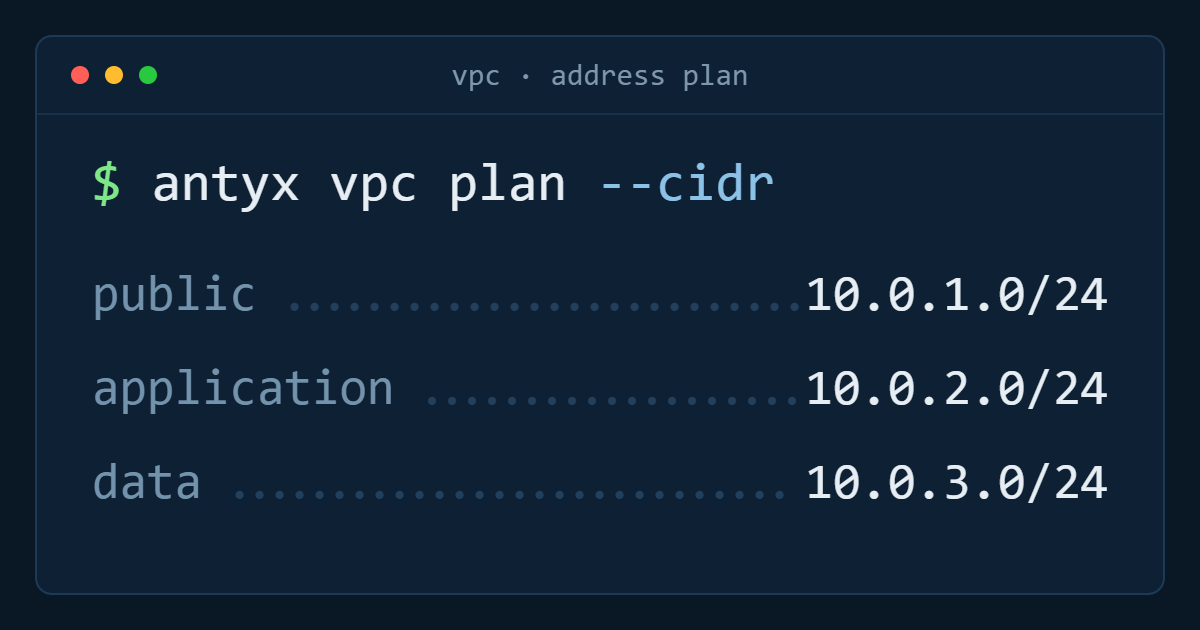
Inside the /16, carve /24 subnets on a predictable grid so anyone reading an address knows where it sits. A layout that works for most multi-tier applications:
10.42.1.0/24 for the public tier — load balancers, a bastion, anything that needs to be reachable from the internet. 10.42.2.0/24 for the application tier, with no public addresses at all. 10.42.3.0/24 for the data tier, with no route to the internet in either direction. Then leave a deliberate gap and start the second availability zone at 10.42.11.0/24, 10.42.12.0/24, 10.42.13.0/24, so the last octet's tens digit tells you the zone and the units digit tells you the tier.
Reserve blocks for things that are not there yet. 10.42.50.0/20 for Kubernetes pod and service ranges — clusters need far more addresses than instances do, and CNI plugins want a contiguous block. 10.42.100.0/24 for VPN clients. 10.42.200.0/24 for management: monitoring collectors, backup proxies, jump hosts.
A /24 per subnet is the right default even when you expect eight machines. The addresses cost nothing, and a uniform mask makes every rule and every route easier to read than a mix of /26s and /28s sized to last year's headcount.
What goes in the document
Write the allocation down before you build it, in a table with four columns: CIDR, purpose, route to internet yes or no, and who can reach it. That table is the design. It is also the thing an auditor asks for, the thing a new engineer reads first, and the thing you check against reality once a quarter.
Include the ranges you have deliberately reserved but not yet used. An unlabelled gap gets filled by whoever needs an address next; a gap labelled reserved for Kubernetes survives.
Routing and gateways, briefly
Only the public subnet needs a route to an internet gateway. The application tier reaches out through a NAT path if it needs package updates or third-party APIs, and the data tier ideally reaches nothing at all — which is both a security posture and a useful constraint, because it forces backup and update paths to be explicit rather than accidental.
Keep route tables per tier rather than one shared table with exceptions. A tier whose route table has exactly two entries is auditable at a glance.
The short version
Take a /16 per environment, from a range that overlaps nothing you might connect to and that is not the default everyone else uses. Lay out /24 subnets on a grid where the address tells you the tier and the zone, reserve blocks for Kubernetes, VPN and management before you need them, and write the allocation table before you build. Twenty minutes at the start; no renumbering at the end.
Antyxsoft VPC lets you define your own address ranges, subnets and routing tables, at no additional charge per network — see how VPC works.
Antyxsoft Cloud
Written by the engineers who operate the Antyxsoft platform.