What a training run actually costs
The hourly rate is rarely more than half the bill. The five line items that make up the rest, and how to measure cost per completed run.
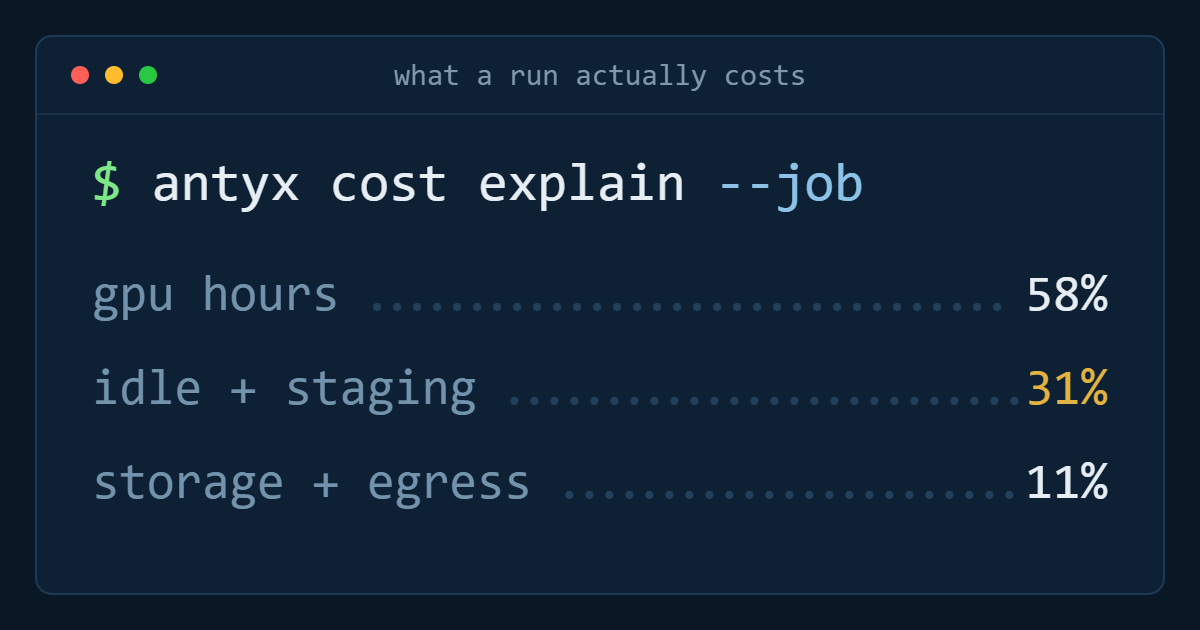
Ask what a GPU costs and you get an hourly rate. Compare two providers and you compare two hourly rates. Then the invoice arrives and it is roughly double what the arithmetic said, and nobody can point at the line that did it.
The hourly rate is real. It is also, for most teams, somewhere between 40% and 60% of what a training programme actually costs. Here is the rest.
1. The hours where nothing trains
You are billed for wall-clock time the instance exists, not for time the accelerator computes. Between those two numbers sit:
- Provisioning and environment setup. Pulling a 12 GB container image, installing drivers, warming caches. Ten to twenty minutes per run, every run.
- Dataset staging. Copying shards to local disk. Minutes to an hour depending on size.
- Checkpoint writes. Small individually, meaningful cumulatively — a 40 GB checkpoint written every epoch for thirty epochs is twenty minutes of GPU sitting idle if the write is synchronous.
- Failed runs. The one that OOM'd at hour six. The one with the wrong learning rate that you killed at hour two. These are the single biggest source of the gap, and no dashboard labels them as waste.
The metric that matters is not GPU-hours consumed. It is cost per completed run. Track that for a month and the difference between a team at 85% useful utilisation and one at 45% is a hiring decision, not a rounding error.
2. Storage, which does not stop when the run does
Compute is bursty. Storage is permanent, and it accumulates quietly.
The dataset itself is usually the smaller half. Checkpoints are the larger one:
checkpoint size × epochs kept × experiments per monthA 7B model checkpointed with optimiser state is around 80 GB. Keep every epoch of a 30-epoch run and that is 2.4 TB for one experiment. Run twelve experiments in a quarter and nobody deletes anything, because deleting someone else's checkpoint is how you become unpopular.
Two fixes, both boring: keep best-and-last rather than every epoch, and put a lifecycle rule on the artefact bucket so anything older than ninety days from a non-promoted run expires. Both are ten minutes of work and both are usually skipped.
3. Egress, the one that compounds
Data goes in free and comes out priced. That asymmetry is a deliberate design choice and it shapes GPU economics more than any hourly rate.
Where it lands on an ML team:
- Moving a dataset to whichever provider has capacity this week.
- Pulling trained weights out to serve them somewhere else — including a different region of the same provider.
- Cross-region checkpoint replication, running continuously in the background.
- Every evaluation job that reads the dataset from another cloud.
Individually each is a defensible engineering decision. Together they mean the cost of leaving grows with every month you stay, which is the actual mechanism of lock-in. Model the exit cost before the dataset is large, because after that the decision is made for you.
4. Spot capacity and the restart tax
Preemptible pricing looks like a 60–70% discount. The real discount is smaller, and it depends entirely on how much work you lose per interruption.
The arithmetic:
effective_cost = spot_rate × (1 + wasted_fraction)
wasted_fraction ≈ (checkpoint_interval / 2) / mean_time_between_preemptions
Checkpoint every 30 minutes on capacity preempted every 3 hours and you lose about 8% — the discount holds. Checkpoint hourly on capacity preempted every 90 minutes and you are losing a third of the run, plus the restart overhead from section 1, and the discount has evaporated.
Frequent checkpointing is the mitigation, and it is not free either: it costs write time and storage. Spot is excellent for long, well-checkpointed, restartable pretraining. It is a poor fit for a fine-tune that finishes in four hours and needs to be done today.
5. The infrastructure nobody is watching
The scheduler head node that runs 24/7 to coordinate jobs that run 6 hours a week. The managed notebook someone started on a GPU instance in March. The staging cluster that mirrors production and serves nobody. The load balancer in front of an inference endpoint with no traffic.
None of these are large. All of them are always on, and always-on beats occasionally-expensive over a quarter. One afternoon with the billing export, sorted by resource and filtered to things with zero utilisation, typically pays for itself several times over.
Putting a number on it
A worked example. Quoted rate €2.50/hour for the accelerator, a 40-hour run:
- Compute at quoted rate: €100
- Setup and staging overhead, 15%: €15
- One failed run out of four attempts, amortised: €25
- Checkpoint and dataset storage, monthly share: €18
- Egress to move weights to serving: €12
€170 against a headline of €100. Not catastrophic — but if you chose the provider on the €2.50 figure and the alternative was €2.90 with no egress charge and faster staging, you chose wrong.
What to measure instead
Three numbers, reviewed monthly:
- Cost per completed run, including failures. This is the honest one.
- Useful utilisation — accelerator-seconds computing, divided by accelerator-seconds billed.
- Standing cost — what the account bills in a week with no experiments running. If that number is not close to storage alone, something is left on.
Every one of these is available from tags and a billing export. None of them appear on a pricing page.
Antyxsoft GPU instances are launching soon, billed monthly on the same invoice as the rest of your estate and with no egress charge on the data you move in and out. Join the waitlist to be allocated capacity when your region opens.
Antyxsoft Cloud
Written by the engineers who operate the Antyxsoft platform.