Sizing a GPU instance: what to put around the accelerator
A GPU is only as fast as the CPU, memory and disk feeding it. How to size the rest of the instance so the accelerator is the bottleneck.
Every GPU procurement conversation is about the accelerator. Which one, how much memory, how many. Almost none of them are about the machine it sits in, which is where most of the wasted money actually goes.
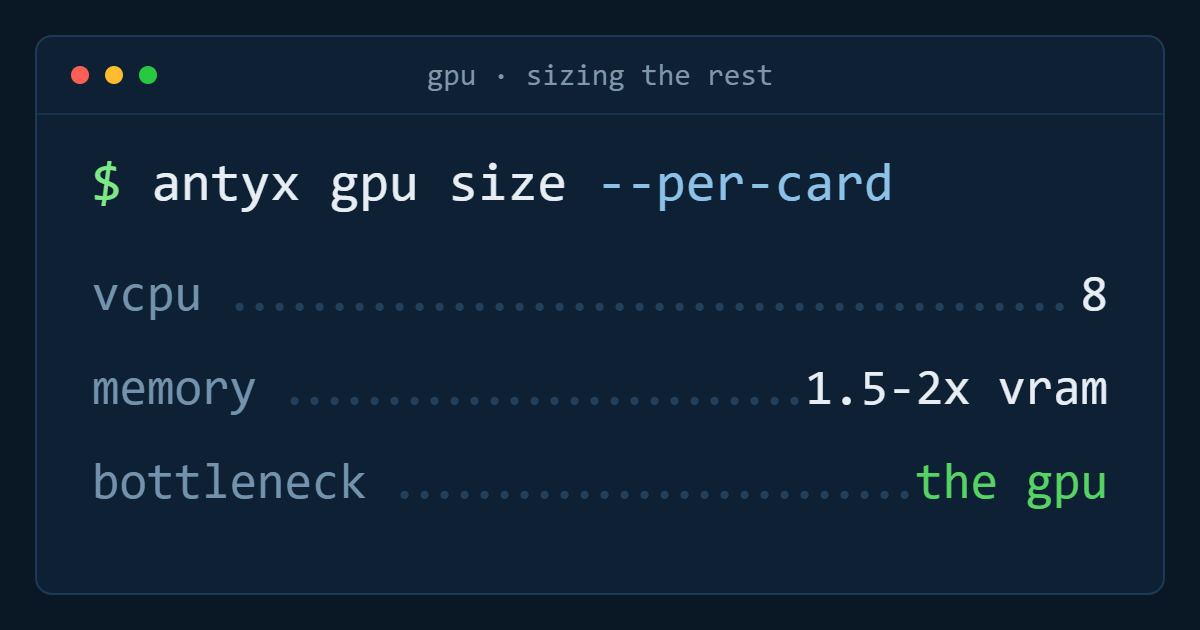
The rule is simple and it is the only one that matters: the GPU should be your bottleneck. If the accelerator is sitting at 40% utilisation because a dataloader cannot keep up, you are not paying for a GPU. You are paying for a very expensive idle fan.
Here is how to size the rest of the instance so that does not happen.
1. vCPU: the dataloader is CPU work
Decode, resize, augment, tokenise, collate. All of it runs on the CPU, all of it happens between batches, and none of it is visible in a training log until you go looking.
Rough starting points per accelerator:
- Vision with real augmentation (decode JPEG, random crop, colour jitter): 8 vCPU. Heavy pipelines want 12.
- Text with pre-tokenised shards: 4 vCPU is usually enough, because you are reading integers off disk and little else.
- Text tokenising on the fly: 8 vCPU, and consider not doing it on the fly.
- Fine-tuning with a small dataset that fits in RAM: 4 vCPU, because after the first epoch there is nothing to decode.
The failure mode is distinctive. Watch utilisation for sixty seconds:
nvidia-smi --query-gpu=utilization.gpu,memory.used --format=csv -l 1A healthy run sits high and flat. A starved run sawtooths — 100, 100, 12, 0, 0, 98 — as the GPU chews a batch faster than the workers can build the next one. That pattern is a CPU problem every time, and adding a second GPU makes it worse rather than better.
2. System memory: two floors, not one
There are two separate reasons to buy RAM and people usually only budget for the first.
The floor for the framework: around 1.5× the accelerator's memory. A 40 GB card wants 64 GB of system memory before anything else is considered, because pinned host buffers, the CUDA context and the model's CPU-side copy all live there.
The floor for the loader: each dataloader worker is a process, and each one holds its prefetch queue. The arithmetic is unforgiving:
workers × prefetch_depth × batch_size × sample_bytesEight workers, prefetch of 2, batch of 64, and a decoded 224×224×3 float32 sample at 600 KB gives roughly 600 MB — fine. Move to 512×512 video frames and the same settings want 12 GB. Nothing warns you; the OOM killer takes the run at hour nine.
Size for the larger of the two floors and add headroom for the dataset index, which for a few hundred million samples is not free either.
3. Local disk: random reads, not throughput
Dataset access during training is small random reads at high rate. That is the worst possible pattern for network storage and the best possible case for local NVMe.
The number that matters is not sequential throughput, it is what happens at queue depth with 4–64 KB reads. Network-attached storage that advertises 500 MB/s sequential can deliver a fraction of that under a random-read shuffle, and the GPU waits for every one of them.
The pattern that works:
- Keep the canonical dataset in object storage. It is cheap and it is the copy you back up.
- Stage the shards you need onto local NVMe once, before the run starts.
- Read from local disk for every epoch.
- Write checkpoints back to object storage, not to the local disk you are about to destroy.
Size local disk at 1.5× the working set. Not the whole dataset — the shards this run touches, plus room for the two most recent checkpoints. Staging is a one-time cost measured in minutes; reading over the network is a cost you pay on every batch of every epoch.
If your dataset genuinely does not fit locally, shard it and use a sequential-friendly format (WebDataset, TFRecord, Parquet) so you are streaming large sequential reads with a shuffle buffer rather than seeking per sample.
4. Network: mostly a staging concern
On a single-node run, network bandwidth affects exactly two things: how long staging takes and how long checkpoint writes take. Both are amortised, neither is worth over-buying for.
Multi-node changes this completely — gradient synchronisation puts the interconnect directly in the critical path, and at that point the fabric between nodes matters more than anything in this article. But most teams asking about multi-node do not need it yet: a single larger accelerator, gradient accumulation and a better dataloader will usually beat two poorly connected machines.
The one network cost worth watching is egress, which is a pricing question rather than a performance one. If your data lives with one provider and your GPUs with another, you pay to move it every time, and that line item has a habit of exceeding the compute it was serving.
5. Verify before you scale
Before adding a second accelerator, prove the first one is saturated. Three checks, in order:
- GPU utilisation over time. Flat and high, or sawtoothing? Sawtooth means CPU or disk.
- Step time with a synthetic loader. Replace the dataset with random tensors of the same shape. If step time drops meaningfully, your bottleneck is the input pipeline, not the model.
- GPU memory used. If you are at 30% of card memory, your batch size is leaving throughput on the table before any hardware change is justified.
A run that fails all three does not need more silicon. It needs four more vCPU and a staging step.
The short version
Per accelerator, as a starting configuration: 8 vCPU, system memory at 1.5–2× card memory, local NVMe at 1.5× the working set, and dataset staging as an explicit step in the job rather than something the loader discovers at runtime. Then measure, and move whichever of the three is actually limiting you.
The accelerator is the expensive part. Everything in this article is about making sure you are using the thing you paid for.
GPU instances on Antyxsoft are not generally available yet — configurations are sized around the accelerator rather than fixed to it, and waitlist accounts are allocated capacity first. Join the waitlist if you want a say in what the first pools look like.
Antyxsoft Cloud
Written by the engineers who operate the Antyxsoft platform.