Block storage or object storage: which one for this data?
A decision guide based on access pattern, latency tolerance and how the data grows — with the three cases where the answer is both.
The question comes up on every new project, and it is almost always asked the wrong way round. Teams start from price per gigabyte, pick the cheaper option, and then spend a quarter working around the fact that it does not behave the way the application expects.
Price is the last input, not the first. The first input is how the application touches the data.
The one question that decides it
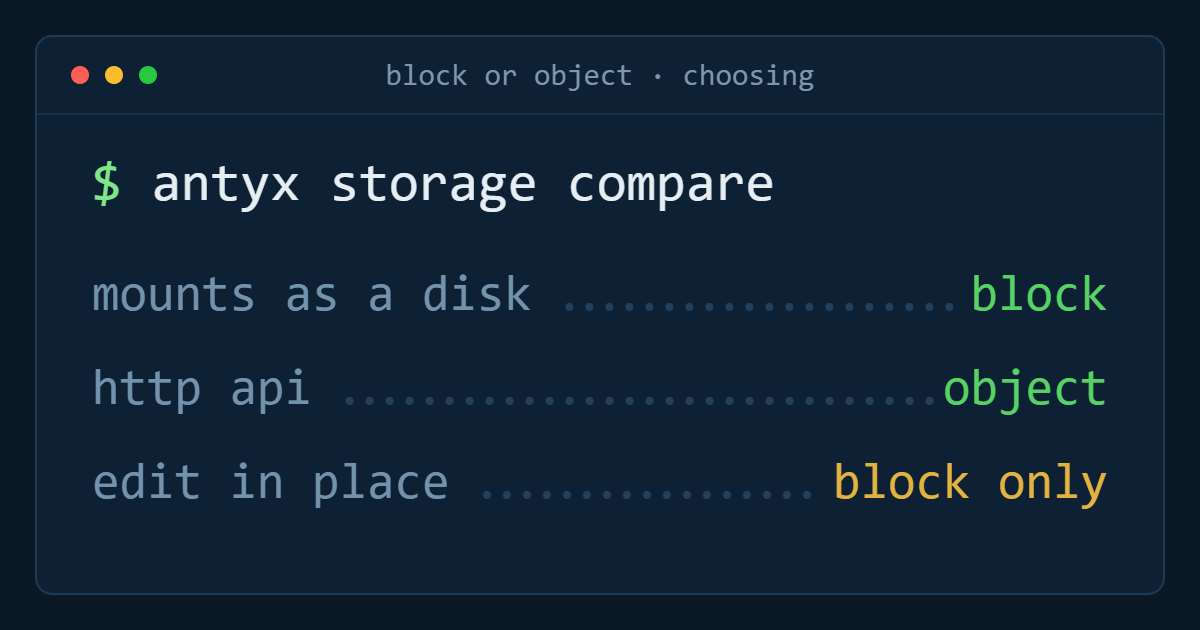
Does the application need to open a file, seek inside it, and write a few bytes in the middle — or does it read and write whole objects?
A database does the first. It opens a data file, seeks to a page, writes 8 KiB, and expects that write to be durable and fast. It needs a filesystem, a block device underneath it, and single-digit millisecond latency. That is block storage, and nothing else will do.
A media pipeline does the second. It uploads a finished 400 MB render, later fetches it whole, and never modifies it in place. It does not need a filesystem or a mount point. It needs a URL. That is object storage.
Most of the confusion comes from applications that sit between the two, so it helps to look at the three properties that actually differ.
Access pattern
Block storage gives you random read/write at byte granularity. You can update a single record without rewriting the file. Object storage is whole-object: a change to one byte means uploading the object again. For a 2 KB config file that is irrelevant. For a 200 GB database file it is impossible.
If you find yourself planning to mount object storage as a filesystem so an application can write into files, stop. It can be done, and it will be slow, inconsistent under concurrency, and hard to reason about when a write fails halfway.
Latency and IOPS
NVMe-backed volumes answer in low single-digit milliseconds and sustain high IOPS. Object storage is measured in tens of milliseconds per request, sometimes more, and is optimised for throughput rather than per-operation latency.
That gap does not matter when you are streaming one large file. It matters enormously when the workload is thousands of small operations per second, which describes every database, every write-ahead log, every busy queue, and every container that writes state to disk.
How the data grows, and who pays for it
Object storage scales without you thinking about it — there is no size to pick and no volume to expand. Block volumes have a size, and you manage it. On Antyxsoft Cloud a volume is a flat 0,10 € per GiB per month in every region and can be expanded at any time with no service interruption, so the management overhead is real but small: notice the volume is at 80%, expand it, extend the filesystem.
The economics flip when the data is large, cold and rarely touched. Keeping five years of finished video renders on a block volume means paying NVMe prices for something you read twice a year. That is the classic case for object storage.
Four common workloads, decided
Relational database (PostgreSQL, MySQL, SQL Server). Block, always. Put the data directory on a dedicated volume rather than the instance disk, so storage and compute scale independently and the data survives a rebuild of the machine.
User uploads served to a web app. Object. Immutable, read-heavy, served by URL, growing without a ceiling. The application should hold references, not bytes.
Stateful workloads on Kubernetes. Block, through the CSI driver. Anything with a PersistentVolumeClaim that a pod mounts and writes into — a database, a queue, a registry, a Prometheus TSDB — wants a real block device attached to the node the pod lands on.
Logs and event data. Usually both, split by age. Hot log and index data on an expandable volume where queries are fast; anything past the query window rolled out to object storage for cheap retention.
The three cases where the answer is both
Splitting by temperature is normal architecture, not a compromise.
The first is the log and analytics case above: recent data on block, archive on object. The second is backup: the working volume is block, the backup copies land on object storage or in a managed backup service, because backups are written once, read rarely, and must not share a failure domain with the live data. The third is media processing: work-in-progress scratch space on a fast volume attached to the worker, finished assets pushed to object storage and the volume cleared for the next job.
In all three the rule is the same. Block storage is where the application works. Object storage is where the results rest.
A short checklist
Before you pick, answer four things: does anything mount this as a filesystem; does anything modify data in place; what is the acceptable latency for a single operation; and will this data still be read a year from now. If the first two are yes, it is block. If they are no and the last one is no, it is object. If you get a mixed answer, you have two tiers, and saying so in the design document now saves a migration later.
Antyxsoft block storage volumes attach to any cloud compute instance or Kubernetes cluster at 0,10 € per GiB per month, in Athens, Barcelona and Boston — see how volumes work.
Antyxsoft Cloud
Written by the engineers who operate the Antyxsoft platform.